
Law firm email management that finally talks to your matters.
Connect Gmail, Outlook, and Microsoft 365 to Legasus. Summarize threads, draft replies, save attachments, route new leads to intake, and link every conversation to the right matter, with attorney approval before anything is sent.
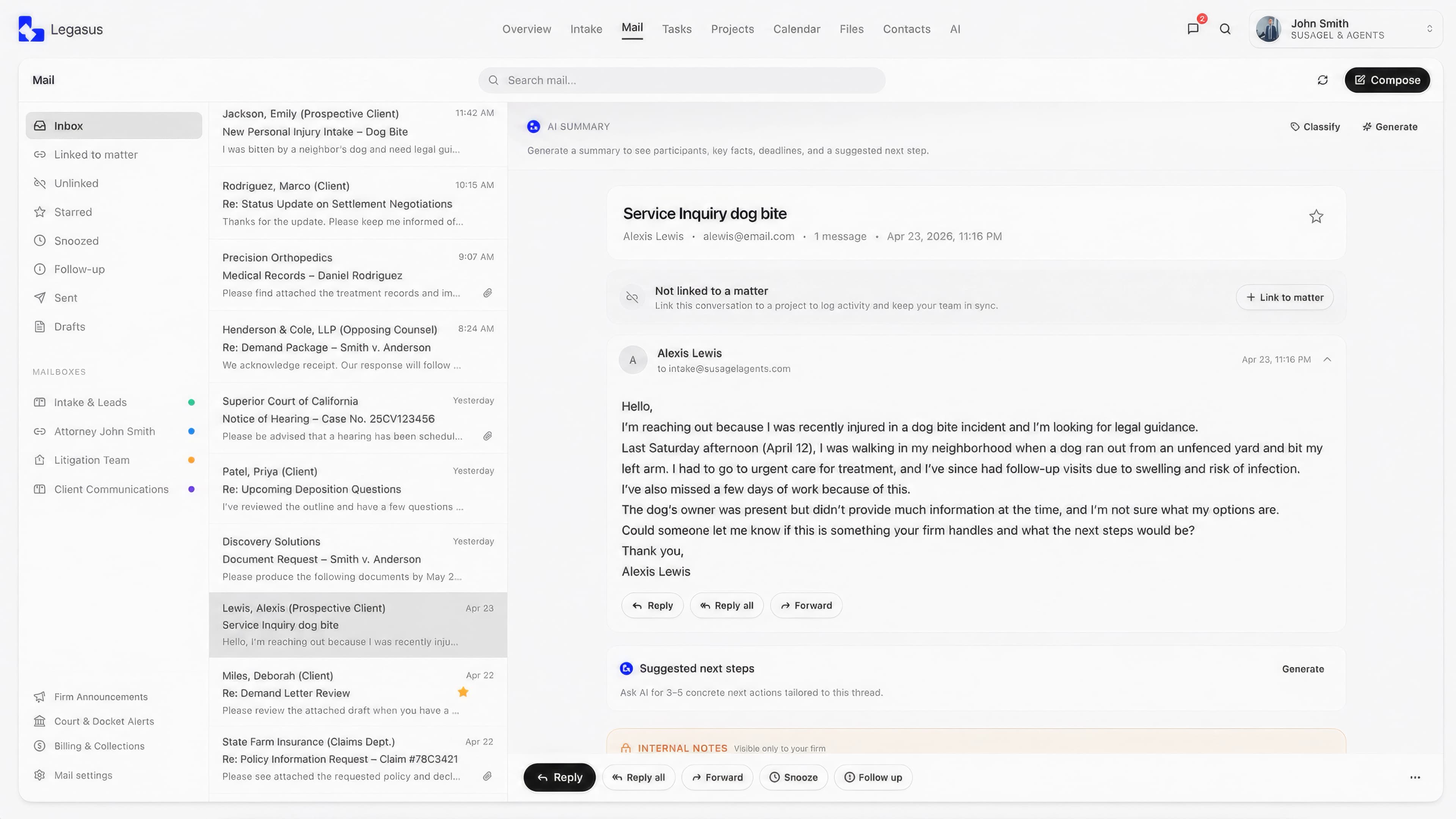
Law firms run on email. But email was never built for case management.
Leads arrive in one inbox. Court notices land in another. Attachments get downloaded, renamed, and re-uploaded. Important conversations stay buried in personal mailboxes instead of living with the matter they belong to.
Missed intake leads
New case opportunities can sit unnoticed in crowded inboxes.
Lost matter history
Important conversations stay disconnected from the case record.
Manual filing work
Staff waste time saving attachments, copying notes, and logging updates.
Use Gmail and Outlook. Work inside Legasus.
Connect Gmail, Google Workspace, Outlook, or Microsoft 365. Your team can send and receive email inside Legasus while still using their native inbox when needed. Threads stay synced, conversations stay searchable, and mail can be connected directly to matters, intake records, tasks, and firm storage.
- Two-way mailbox sync
- Send and receive inside Legasus
- Continue using Gmail or Outlook
- Sync personal and shared inboxes
- Keep conversations searchable by matter
Turn new emails into organized intake opportunities.
When a new lead emails your firm, Legasus can identify the sender, summarize the request, flag the message as a potential intake, and surface it inside your Intake page for review. Your team can confirm the lead, assign it, start the intake workflow, and keep the original conversation attached from day one.
- Sender
- Maria Alvarez
- Source
- Case type
- Personal Injury
- Incident
- Rear-end collision
- Detect potential lead emails
- Summarize the request before staff opens the full thread
- Route qualified messages to Intake
- Assign follow-up to the right team member
- Keep the original email attached to the intake record
- Convert intake records into matters without losing context
Every important conversation belongs with the case.
Link an email thread to a matter once, and future replies can stay connected. Attorneys and staff can open a matter and see related emails, attachments, notes, activity, and AI summaries in one place.
- Link threads to existing matters
- Create new matters from qualified conversations
- View matter-linked email history
- Save attachments to firm storage
- Log emails to the matter activity feed
- Keep unlinked mail in a triage queue
Linked mail stays with the matter, so the case record reflects the full conversation history.
Unlinked mail appears in a triage queue where AI can suggest candidate matters for user confirmation.
AI-assisted email, built into your firm's inbox.
Legasus Mail AI helps your team summarize long threads, classify senders, identify urgent next steps, recommend matter links, and prepare replies for approval. It works inside Legasus Mail, so email intelligence stays connected to intake, matters, tasks, files, and firm permissions.
Summarize threads
Understand long conversations without rereading every message.
Find next steps
See suggested actions based on the thread and matter context.
Recommend matter links
Connect conversations to the right case with user confirmation.
Draft for approval
Prepare replies in the user's style while keeping sending under human control.
See the full AI workflow on the Mail AI page.
Personal inboxes for users. Shared inboxes for the firm.
Each user can connect their own mailbox, while admins can manage shared firm addresses like intake@, info@, or support@. Permissions control who can view, reply, send, and manage shared inboxes.
Attorney inbox
Personal mailbox connected to the attorney's matters, tasks, and communication history.
Paralegal inbox
Staff can manage assigned communication, draft replies, and prepare messages for review.
Shared intake inbox
Route new lead emails from intake@firm.com into the Intake page for review and assignment.
Draft faster. Approve before sending.
Compose rich-text emails, use firm-approved templates, apply signatures, and draft responses with AI. Paralegals can prepare replies for attorney review, and AI-generated drafts always require approval before sending.
- Rich-text compose
- Drafts and sent mail
- Per-account send identity
- Firm-approved signatures
- Reusable response templates
- Attorney approval workflows
- AI-assisted reply drafting
AI can help prepare the message. The user stays in control of what gets sent.
Next steps for your intake
To: Maria Alvarez
Hi Maria, thank you for reaching out. To help our team review your potential claim, please complete the intake form below and upload any relevant documents you have available.
Automate the filing. Keep control of the judgment.
Create rules that help organize incoming mail by sender, domain, subject, mailbox, classification, or matter. Legasus can suggest where a message belongs, mark follow-ups, log activity, or route potential leads to intake.
Rule: Insurance follow-up
ActiveIf
Then
Automation controls
- Match by sender or domain
- Match by subject or mailbox
- Use AI classification as a condition
- Suggest matter links
- Create follow-up tasks
- Log email activity
- Route potential leads to intake
Built for firm control, not inbox chaos.
Manage mailbox permissions, matter access, ethical walls, legal holds, retention policies, and audit history. Legasus keeps communication connected while giving firm leadership the controls they need.
Ethical walls
Restrict access to sensitive matters and related communication based on firm permissions.
Legal holds
Prevent deletion of protected communication when a matter requires preservation.
Retention policies
Set firm rules for how communication is archived, retained, or reviewed.
Audit history
Track key actions across mailbox sync, matter linking, file saves, approvals, and sends.
Tenant isolation
Keep firm data separated by organization and governed by access controls.
Export support
Support export workflows for email records when the firm needs them.
Built with security, privacy, and compliance-focused controls for modern law firms.
See mail with AI on your own inbox.
Book a demo and see how Legasus can connect your firm's email to intake, matters, documents, tasks, and AI-assisted communication.
See where firm communication is going.
Track email volume, unread load, linked vs. unlinked threads, intake candidates, response activity, staff workload, and failed sync events. Know which inboxes are moving cases forward and which ones need attention.
Mail volume, 7 days
Less inbox work. More complete matter history.
Legasus Mail helps firms reduce manual email triage, improve intake visibility, and keep case communication organized from the first message to the final follow-up.
Faster triage
AI summaries and suggested actions help staff understand long threads without reading every reply from scratch.
Less manual filing
Attachments, activity logs, and email history can live closer to the matter they support.
Cleaner case records
Matter-linked email keeps important communication connected to the file.
Better intake visibility
Potential leads can be flagged, reviewed, assigned, and moved into intake.
Frequently asked questions about law firm email management.
The rest of the platform.
Intake Intelligence
Capture calls and emails in one intake workspace. Qualify new leads, track every touchpoint, and convert the right opportunities into organized matters.
Case Management
Manage every case from intake to resolution in one organized workspace. Keep matter details, notes, tasks, contacts, and documents easy to find.
Task Management
Keep your legal team on track with clear tasks, deadlines, reminders, and firm-wide visibility into what needs to get done.
Contact Management
Centralize clients, leads, referral partners, and case contacts in one law firm CRM built around your matters.
Calendar
Manage court dates, consultations, deadlines, and team schedules with calendars built for busy law firms.
Files & DocGen
Create, manage, preview, and store legal documents directly inside each matter, so your team can work faster with less manual admin.
Make your inbox part of your firm.
See how Legasus connects Gmail and Outlook to matters, intake, files, tasks, and Mail AI.